Aeotec Home Energy Meter Gen5
Homeowner Summary
The Aeotec Home Energy Meter Gen5 (HEM Gen5) measures your home's whole-house electricity use — current, voltage, and power — and reports it to Shipshape over Z-Wave. It installs at your main electrical panel, where clamps around the incoming power cables read how much energy the whole house is drawing. Shipshape uses that data to track energy use and flag unusual patterns.
This is the earlier generation of Shipshape's energy meter; newer installs use the Aeotec Home Energy Meter 8. HEM Gen5 units already installed are fully supported. Like any device that connects at the main panel, the electrical installation must be done by a licensed electrician — only the Z-Wave pairing step is something you can do yourself.
How It Works
The HEM Gen5 has two parts: the Main Body (the meter and radio) and the clamps (current transformers, or CTs). The clamps fasten around the main incoming cables in your circuit box and sense the current flowing through them; the Main Body converts that into power readings and transmits them to your Shipshape gateway over Z-Wave Plus.
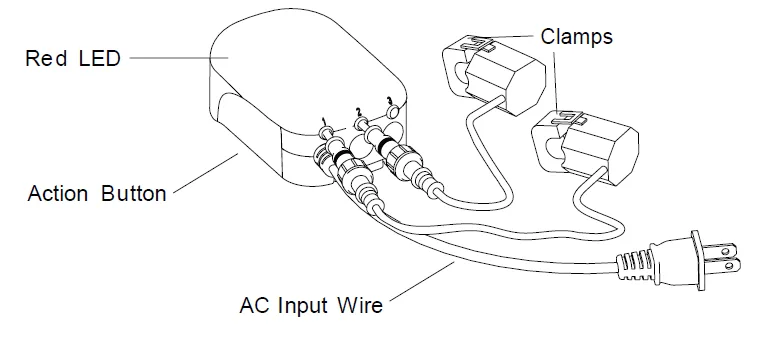
Maximum current depends on the clamp version — 60, 100, or 200 amps per clamp (printed on the product label). In the United States the meter is always wired as a 2-phase installation, with two clamps and a plug.
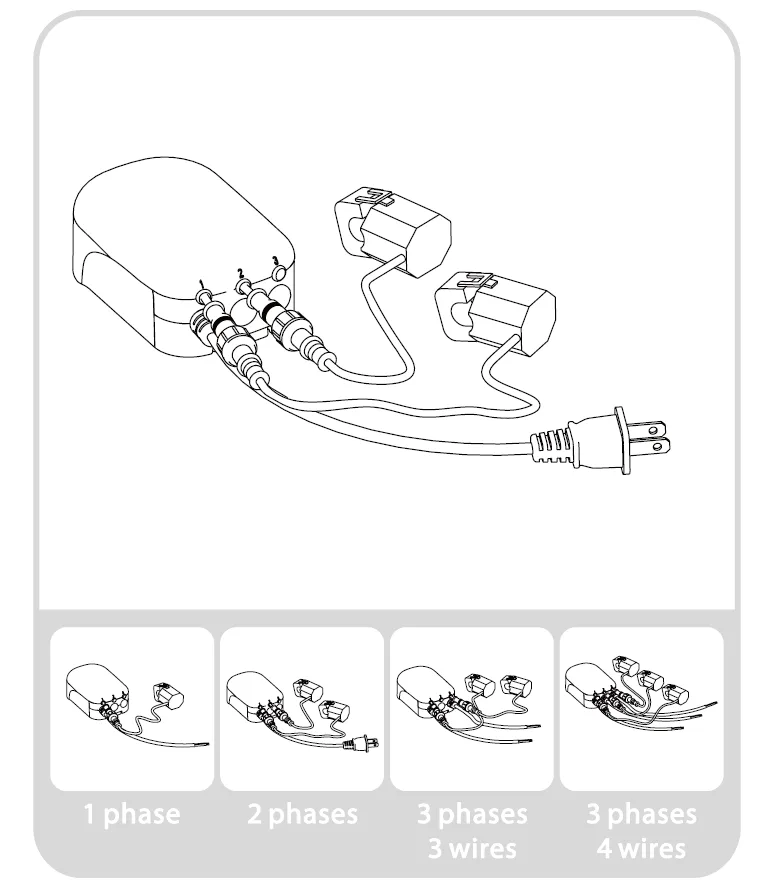
The Main Body contains a low-frequency radio antenna, so its final placement affects signal strength — thick concrete, metal, or nearby motors degrade wireless range. If the circuit box is metal, the Main Body is best mounted outside the box; it's weatherized to IP44 (rain/snow resistant when mounted vertically).
Installation (Licensed Electrician Only)
The electrical installation must be performed by a licensed electrician with the main breaker turned off. High-level sequence:
- Turn off the home's main breaker and open the main circuit-box panel.
- Connect each clamp to the HEM with its connector and screw it tight.
- Clip the clamps around the incoming electricity cables that feed the main breaker.
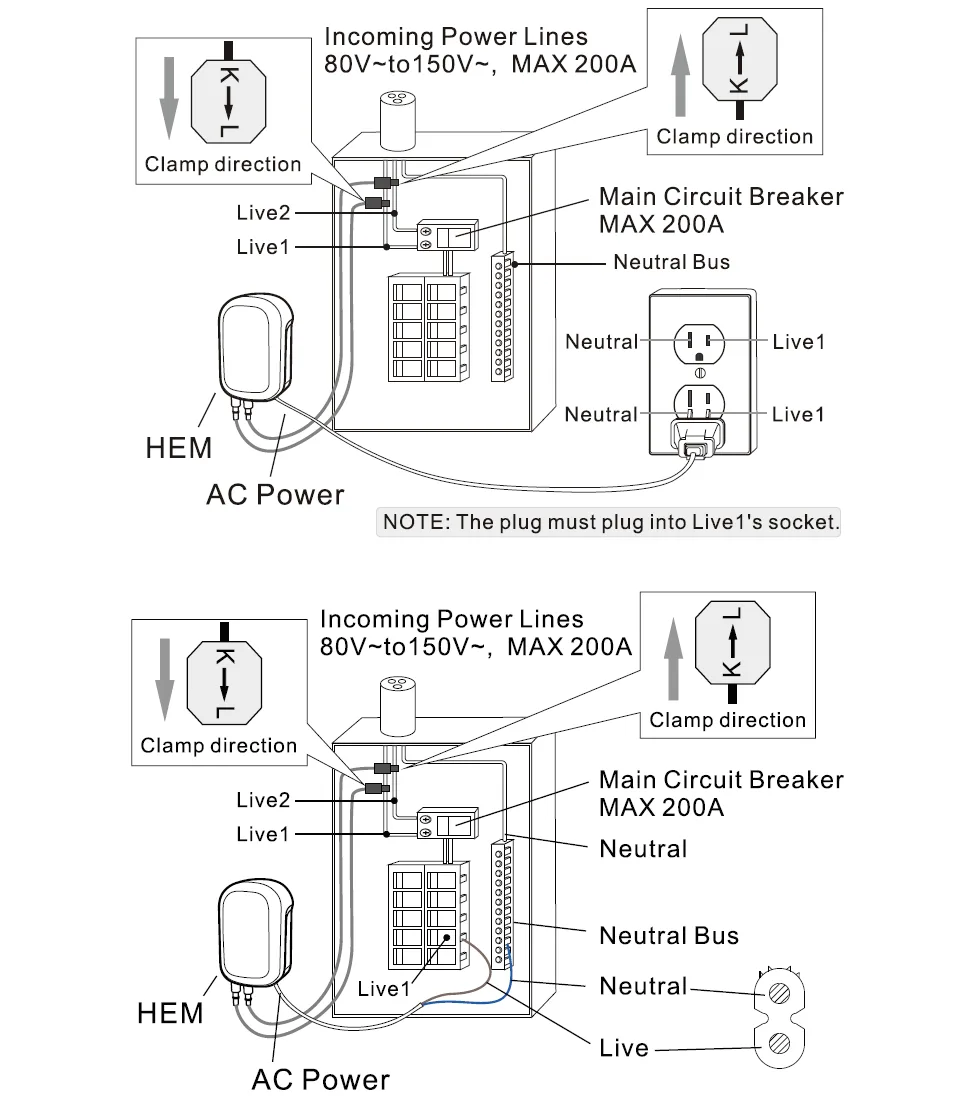
- Connect the HEM's AC wire: neutral to the panel's neutral bus, live to the live terminal.
- Replace the panel and turn the main breaker back on.
- Mount the Main Body: remove its backing plate, screw the plate to the wall vertically (wires at the bottom), and attach the meter. Place it where the radio has good range (outside a metal box if needed).
The US wiring diagram shows which way each clamp faces (the K→L arrow on the clamp) and the two ways to power the meter: plug it into an outlet on the Live1 circuit, or wire it to the neutral bus and a Live1 breaker.
Pairing (homeowner-doable):
- Put your gateway/hub into Z-Wave inclusion mode.
- Press the Action Button on the HEM. A steadily illuminated LED means it linked successfully; a continued blink means it didn't — retry.
To factory reset the meter, see Factory Resetting Aeotec Devices.
Maintenance Guide
- Don't open the circuit box yourself — clamp and wiring work is for a licensed electrician only.
- Mind the placement. If readings drop out, the Main Body may be shielded by metal or too far from the gateway; a range extender can help.
- Match the clamp rating (60/100/200 A) to your service.
- Keep it sheltered. Indoors or a sheltered spot is best, away from open flames, direct heat and direct sunlight. The IP44 rating handles rain and snow only when the meter is mounted vertically.
Pro Detail
Gateway compatibility
If you're adding the meter to a Z-Wave gateway yourself, check Aeotec's list of compatible gateways first. Aeotec publishes the meter's technical specifications.
What it reports
The meter reports power in watts and energy in kWh to the gateway, through the Z-Wave Meter command classes. How the readings are shown depends on the gateway's software.
Shipshape Integration
The HEM Gen5 gives Shipshape a whole-home view of electricity use. SAM uses it to track consumption over time and flag anomalies — a sudden jump in baseline draw, or an unexpected spike — that can point to a failing appliance or a system left running. For newer installations, the Aeotec Home Energy Meter 8 provides the same whole-home monitoring.