Aeotec Range Extender 7
Homeowner Summary
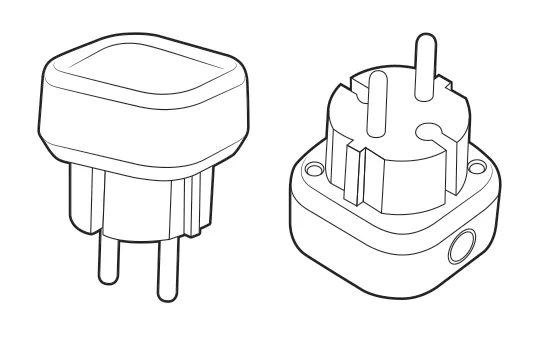
The Aeotec Range Extender 7 is a small plug-in device that strengthens and extends the Z-Wave wireless network in your home. Think of it like a WiFi extender, but for the Z-Wave signals that your Shipshape sensors use to communicate with the hub. If you have sensors in distant rooms, in the basement, in an attic, or on the opposite end of a large home from the hub, a range extender helps those sensors keep a strong, reliable connection.
Z-Wave is a mesh network technology, which means every mains-powered Z-Wave device (such as the Range Extender or a smart plug) helps relay signals for nearby battery-powered sensors. The Range Extender's sole job is to be a relay point. It plugs into a standard wall outlet, immediately joins your Z-Wave mesh, and begins forwarding signals between sensors and the hub. It has no other function — it exists purely to ensure reliable connectivity.
Range extenders matter most in larger homes, homes with thick walls (concrete, brick, plaster with metal lath), multi-story homes where the hub is on one floor and sensors are on another, or homes where sensors need to reach detached structures like garages or pool houses. Battery-powered sensors have less range than devices that plug into an outlet, so a sensor in a basement or crawlspace will likely need one.
How It Works
Z-Wave devices communicate in a mesh pattern. When a sensor needs to send data to the hub, it can either transmit directly (if the hub is within range) or pass the message through intermediate devices that relay it along. Each relay hop adds a little delay but enables sensors to communicate across distances far greater than a single radio transmission can cover.
The Range Extender 7 uses an Aeotec Gen7 Z-Wave Plus radio that is always powered and always listening. When it receives a Z-Wave message from a nearby device, it retransmits it toward the hub (or toward the next relay in the chain). Z-Wave supports up to 4 hops between any device and the hub. In practice, 1 to 2 hops is ideal for low latency and high reliability.
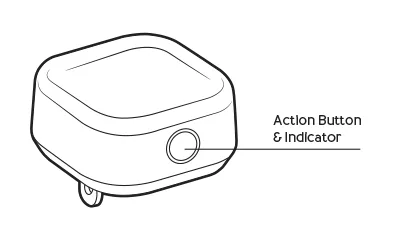
The device is compact (the US version is 53.2 x 46 x 40 mm) and plugs directly into a wall outlet. It draws little power: 0.6 watts for the US version. A small white LED shows its status: it breathes slowly while the extender isn't paired, and stays on once it is (see LED Status below).
LED Status
| LED | What it means |
|---|---|
| Slow "breathing" white | Not paired to a Z-Wave network |
| Quick white flashing, up to 30 seconds | Pairing in progress |
| Brighter, then steady | Paired |
| Off | Paired with its LED turned off, or no power |
Once the extender is paired, you can turn its LED off or back on: double-tap the button on its side within 1 second.
Mesh Network Fundamentals
- Range — Aeotec rates the Shipshape gateway at up to about 130 ft (40 m) indoors without a repeater, and the Range Extender 7 at more than 229 ft (70 m) indoors. Metal and stone in the signal's path shorten it.
- Maximum hops — Z-Wave allows 4 hops maximum between any device and the hub. Fewer hops means lower latency and higher reliability.
- Automatic routing — Z-Wave devices automatically discover the best path to the hub. If a relay point fails, devices reroute through alternative paths. Adding a range extender gives the network more routing options.
Setup Guide
Installation
In most homes your installer pairs the Range Extender for you.
-
Identify the location where connectivity is weakest. This is typically the midpoint between the hub and the most distant sensor.
-
Plug the Range Extender into a wall outlet at that location. Its white LED breathes slowly while it waits to be paired.
-
Put the Shipshape gateway into pairing mode. Your installer does this by adding the device in the Shipshape app.
-
Give the button on the side of the Range Extender (Aeotec calls it the Z-Wave or Action button) one quick tap. The white LED flashes quickly for up to 30 seconds while it pairs.
-
A brighter LED means it paired. If the LED goes back to breathing slowly, pairing failed: start again from step 3.
-
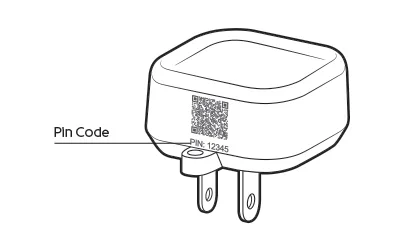
If you're asked for a security (S2) code, enter the first 5 digits of the DSK. It's the PIN printed on the extender, right under the QR code.
-
After pairing, run Optimize Network in the Shipshape app: Manager > Manage Network > tap the gateway > Details > Optimize Network. This makes every device find its best route again, now including the new extender. Do the same if you move the extender later.
-
The app warns that it can take up to 15 minutes, and that you can't add or remove sensors while it runs. Aeotec notes that on a large network it can take several hours. Test sensor connectivity after it finishes.
To start over with an extender that won't pair, see Factory Resetting Aeotec Devices.
Optimal Placement Strategy
The key principle is to place range extenders between the hub and distant sensors, not next to either end.
Large single-story home:
- Place one extender roughly in the middle of the home, ideally in a hallway.
Two-story home (hub on first floor, sensors on second):
- Place one extender at the top of the stairs or in a second-floor hallway. Z-Wave signals travel vertically through wood floors reasonably well, but a relay on the second floor eliminates the vertical attenuation.
Three-story or large home:
- Place one extender per floor, positioned centrally. This creates a vertical chain, so sensors on every floor have a relay nearby.
Detached garage or outbuilding:
- Place one extender in the room of the main house closest to the outbuilding. If the outbuilding is far from the house, an extender may also be needed inside it.
Where NOT to Place
- Anywhere damp or wet, or outdoors: the Range Extender 7 is for indoor, dry locations only
- Near open flames or other heat sources, or in direct sunlight
- Inside metal enclosures (breaker boxes, metal cabinets)
- Behind large metal appliances (refrigerators, washers)
- In basements with poured concrete walls (place on the main floor above instead)
- Directly next to the hub (provides no range benefit)
Maintenance Guide
DIY (Homeowner)
- Keep plugged in — The extender must remain powered to function. If you move it to a different outlet, run Optimize Network afterward so devices find their routes again.
- Observe the LED — A steady white LED means it's paired and working. A slowly breathing LED means it isn't paired to the network. If the LED is off, it may have been turned off on purpose (double-tap the button to turn it back on), or the outlet may have lost power.
- Do not use with smart plugs — Plugging a range extender into a smart plug that can be turned off defeats the purpose.
Professional
- Check its signal — The Range Extender's screen in the Shipshape app shows its signal as Connected, Low Signal Strength or Lost Connection.
- Test signal path — Temporarily remove the extender and check if distant sensors lose connectivity. This confirms the extender is actively being used as a relay.
- Reposition if needed — If sensor connectivity issues persist despite the extender, try moving it to a different outlet. Wall construction and interference sources vary.
- Run Optimize Network — After you add, move or remove devices, run Optimize Network in the app to rebuild routes.
Warning Signs
- Distant sensors frequently showing "offline" then "online" (marginal signal, extender may need repositioning)
- LED on the extender is off when it normally stays on (outlet lost power)
- LED on the extender breathes slowly (it is no longer paired to the network)
- Adding a new sensor in a distant location fails to pair (extender may not be in the path between the hub and the new device's location)
Pro Detail
Specifications
From Aeotec's technical specifications and user guide (US version):
| Spec | Value |
|---|---|
| Model | ZW189 (US: ZW189-A01) |
| Z-Wave | Z-Wave Plus (Aeotec Gen7) |
| Security | S2 Authenticated and Unauthenticated, SmartStart |
| Frequency | 908.42 MHz (US/CA) |
| Function | Signal repeater only (supports beaming) |
| Power | Mains (wall outlet, US 120 V, 60 Hz, 100 mA max) |
| Power consumption | 0.6 W |
| LED | White status indicator (see LED Status) |
| Max Z-Wave nodes supported | 232 (network limit) |
| Range (Aeotec's rating) | More than 229 ft (70 m) indoors, up to 492 ft (150 m) outdoors |
| Dimensions | 53.2 x 46 x 40 mm |
| Weight | 38 g |
| Operating temp | 0 to 40 C (32 to 104 F) |
| Operating humidity | 8% to 80% RH |
| Indoor/outdoor | Indoor only, dry locations (IP20) |
| Plug | Type A |
Other Regions
| Version | Model | Frequency | Power input | Power consumption | Plug | Dimensions |
|---|---|---|---|---|---|---|
| EU | ZW189-C15 | 868.42 MHz | 100-240 V AC, 50/60 Hz, 150 mA max | 1.2 W | Type E/F | 46 x 46 x 60.65 mm |
| UK | ZW189-C07 | 868.42 MHz | 100-240 V AC, 50/60 Hz, 150 mA max | 1.2 W | Type G | 53.2 x 46 x 48.6 mm |
| AU | ZW189-B21 | 921.42 MHz | 100-240 V AC, 50/60 Hz, 150 mA max | 1.2 W | Type 21 | 46 x 46 x 48.6 mm |
SmartStart Pairing
On a Z-Wave gateway that supports SmartStart, the Range Extender 7 can join without a button press:
- In the gateway's app, choose SmartStart inclusion and scan the QR code on the extender.
- Plug the extender in. Within 10 minutes of being powered, it joins the network on its own.
- The LED flashes for 1 second when the extender is powered, then stays bright for 2 seconds once it has joined.
Pairing with Other Z-Wave Hubs
Shipshape homes use the Shipshape gateway (see Setup Guide). Aeotec has its own setup guides for other hubs:
- Range Extender 7 with AutoPilot
- Range Extender 7 with Smart Home Hub / SmartThings
- Range Extender 7 with Hubitat
- Range Extender 7 with Home Assistant
Before buying an extender for your own hub, check Aeotec's compatibility list and the Range Extender 7 product page.
Z-Wave Network Troubleshooting
| Symptom | Likely Cause | Solution |
|---|---|---|
| Sensor works intermittently | Marginal range | Add extender midway between sensor and hub |
| Sensor pairs but never reports | Too many hops (>4) | Move extender closer to sensor |
| All sensors offline | Hub issue, not extender | Check hub connectivity first |
| Extender added, but distant sensors still drop off | Routes not rebuilt | Run Optimize Network in the app |
| Ghost node errors | Previous device not properly excluded | Exclude phantom device, then run Optimize Network |
| Slow response to commands | Network congestion or suboptimal routing | Run Optimize Network |
Common Failure Modes
- Outlet power interruption — GFCI outlets, switched outlets, and circuits that trip under load can temporarily or permanently disconnect the extender. Verify the outlet is always on.
Shipshape Integration
Range extenders help sensor readings reach Shipshape. They don't send readings of their own, but whether they are in place and working affects how reliably the home is monitored.
Monitoring:
- Shipshape tracks whether each range extender is online. An offline extender may not cause sensor dropouts right away, because Z-Wave can route around it.
Alerts:
- An offline range extender shows as a Sensor is offline alert in the app for the home, after 15 minutes offline. It doesn't send a push notification.
Home Health Score:
- Range extenders don't count toward the Home Health Score.