How to Change Your Password
Changing Your Password
Keeping your account secure is important, and updating your password regularly is one of the easiest ways to do it. Whether you want to strengthen your password or just need a fresh start, it only takes a few minutes.
How to Change Your Password in the App
The app doesn't have a change-password screen. To pick a new password, log out and use the reset email:
- Open the Menu, tap your name (Manage your Account), then tap Log Out.
- Follow the steps in What If You Forgot Your Password? below. It works the same way.
Password Requirements
Your new password must be 8 to 32 characters long.
Stronger passwords mix uppercase and lowercase letters, numbers, and a special character like !, @, or #. The more variety, the harder it is for someone to guess.
What If You Forgot Your Password?
If you cannot remember your current password, you do not need to worry. You can reset it from the login screen.
-
Open the Shipshape app.
-
On the sign-in screen, enter the email address for your Shipshape account and continue.
-
Tap Forgot Password?
-
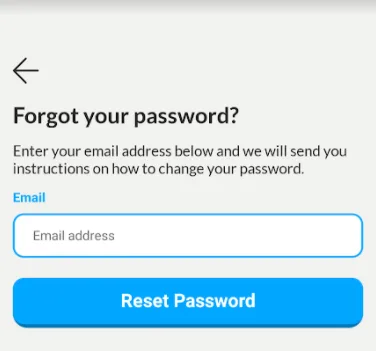
Tap Reset Password.
-
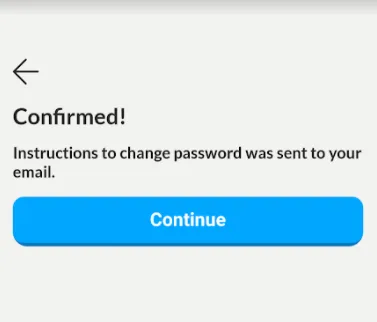
A Confirmed! screen tells you the instructions were sent to your email. Tap Continue.
-
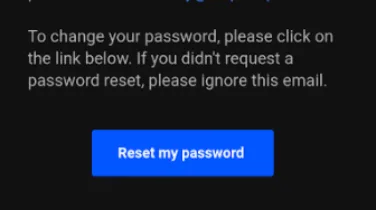
Check your inbox for an email from Shipshape.
-
Open it on your phone and tap the link.
-
Enter a new password that meets the requirements above, twice.
-
Tap Update Password.
You're then signed in with your new password.
Important Details About the Reset Email
- The reset email comes from noreply@shipshape.ai.
- If you do not see it in your inbox within a few minutes, check your spam or junk folder.
- Adding noreply@shipshape.ai to your contacts can help ensure future emails land in your inbox.
- The reset link is valid for 72 hours (3 days). After that, you will need to request a new one.
- Each reset link can only be used once. If you need to reset again, go through the Forgot Password flow a second time.
After Changing Your Password
Once your password is updated, keep a few things in mind:
- Other devices: The next time Shipshape asks you to log in on another phone or tablet, use your new password.
- Saved passwords: If your phone or browser has your old password saved, make sure to update it there too. Otherwise you might get locked out the next time auto-fill tries to log you in.
- Password manager: If you use a password manager (like 1Password, LastPass, or the one built into your phone), update your saved entry for Shipshape.
Tips for a Strong Password
Your Shipshape account holds detailed information about your home, its equipment, and its condition. A strong password helps keep that information safe.
Here are a few simple tips:
- Use a password manager. This is the single best thing you can do for security. A password manager creates and remembers strong, unique passwords for every account you have. Most phones have one built in.
- Do not reuse passwords. If you use the same password for Shipshape that you use for other accounts, a breach on any one of those services could compromise all of them.
- Avoid obvious choices. Passwords like "password123," your street address, or your pet's name are easy to guess. Aim for something that only you would know.
- Longer is better. A four-word passphrase like "blue-garden-morning-42" is both easy to remember and very difficult to crack.
Having Trouble?
If you are running into issues changing or resetting your password, here are a few things to try:
- Make sure you are running the latest version of the Shipshape app. Older versions may have bugs that have since been fixed.
- If the reset email never arrives, double-check that you are entering the exact email address you used when you created your account.
- Try requesting the reset link again. Occasionally, email delivery can be delayed.
- If nothing works, contact Shipshape support. We can verify your identity and help you regain access to your account.
Logging In on Multiple Devices
Your Shipshape account works on any phone or tablet, and you can be logged in on more than one at a time. Your home data, alerts, and history are all stored in the cloud, so nothing is lost when you log in from a new device.
Your Security Matters
We take the security of your home data seriously, and we will never ask you for your password. If anyone ever contacts you claiming to be from Shipshape and asks for your password, do not share it. That is not us.
For more information on managing your account, see our guide on the Shipshape homeowner app.