Understanding Humidity Alerts: Keeping Your Home Mold-Free
Short Answer
Mold needs moisture to grow, and humidity is how you control it. Keep your home's relative humidity in the healthy 30% to 50% range and mold can't get a foothold. When humidity climbs into risk territory and stays there, SAM sends you a humidity alert in the app and by email so you can act before mold ever appears.
The fastest fix when you get an alert: turn on a fan or dehumidifier, open a window if it's dry outside, and check for any leak feeding the moisture. The alert clears on its own once humidity has stayed below 70% for six hours. Everything below explains what each alert means and how to keep your air healthy year round.
What does a high humidity alert mean?
A humidity alert from SAM means the relative humidity (RH) inside your home has climbed into a range where moisture can condense on surfaces like walls, windows, and ducts, and where mold can begin to grow. Your Shipshape sensors track RH in real time, and SAM notifies you by push notification and email when levels move into risk territory and stay there.
The system is built around sustained conditions, not momentary spikes. The quick burst of humidity after a hot shower is harmless and clears on its own, so SAM ignores it. It alerts you when humidity stays elevated long enough to actually threaten your home. The exact trigger logic is in the Alert Types table below.
Why does high humidity cause mold?
Mold spores are naturally present in the air everywhere. They only become a problem when they find moisture to germinate. As RH rises, moisture condenses on cool surfaces and creates exactly the conditions spores need to take hold and spread. Under warm conditions (above 70°F), visible mold can appear in as little as 24 to 48 hours.
The risk factors that turn humidity into mold:
- Elevated relative humidity. The ideal range is 30% to 50% RH. Sustained levels above that are where mold risk climbs.
- Poor ventilation. Bathrooms, kitchens, and basements with limited airflow trap moisture against surfaces.
- Leaks and water intrusion. Plumbing leaks, roof leaks, and flooding amplify mold risk by adding a constant moisture source.
Beyond mold, sustained high humidity also causes wood rot (including the subfloor and floor joists under your living space), warped hardwood floors, peeling paint and wallpaper, musty odors in carpet and drywall, rust on metal fixtures, and a rise in dust mites (which thrive above 50% RH). Damp spaces also attract pests. On the health side, mold exposure can trigger allergies, worsen asthma, and irritate the respiratory system, especially for sensitive individuals. Preventing mold through humidity control is far more effective, and far cheaper, than remediating it after the fact.
For deeper background, the EPA's Brief Guide to Mold, Moisture and Your Home and the CDC's page on mold and health are excellent, authoritative references.
The Mold Connection
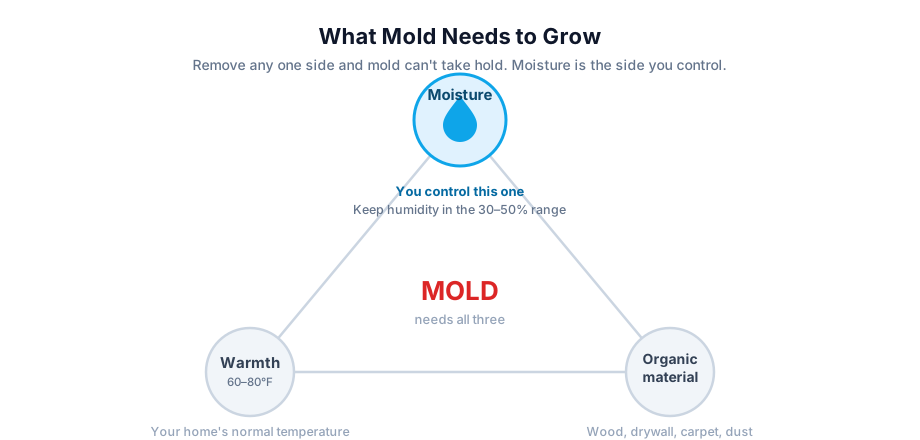
Mold needs three things to grow: moisture, warmth, and organic material (wood, drywall, carpet, dust). You cannot realistically remove warmth or organic materials from your home, which leaves moisture as the one ingredient you control. Keep sustained humidity in the healthy band and you starve mold of the thing it cannot live without. That is why a humidity alert is really a mold-prevention alert. For the full prevention and cleanup playbook, see Mold Prevention and What to Do If You Find It.
Alert Types and What They Mean
SAM uses several humidity alert types so a single damp afternoon does not read the same as a chronic problem. Here is the logic behind each, and what to do when you receive it.
| Alert Type | What It Means | Trigger Logic | What to Do |
|---|---|---|---|
| Humidity Too High | Humidity has risen above safe levels and could cause condensation and start mold growth if not addressed quickly. | RH stays at 70% or more for 4 hours, 75% or more for 2 hours, or 80% or more for 30 minutes. | Run a dehumidifier or fan, open windows if the weather allows, and check for leaks or poor ventilation. Watch the level in the app to confirm it drops. |
| Humidity Too High (Persistent) | Humidity is staying high over time, pointing to an ongoing issue like a struggling HVAC system or humid outdoor air seeping in. | The alert stays open for more than 12 hours, or it comes back after 2 or more alerts of the same kind ended in the past 12 hours. | Inspect for chronic problems (blocked vents, a damp basement). Run a dehumidifier continuously and consider professional HVAC service. Pro Monitoring subscribers may get a follow-up from our team. |
| Humidity Too High (Recurring) | High humidity keeps returning, suggesting a pattern like daily cooking or showering without enough exhaust, or a seasonal issue. | "Humidity Too High" comes back after it has already come and gone 3 or more times in the past 7 days. | Review your routines: add exhaust fans in bathrooms and kitchens, seal windows, or add moisture-absorbing plants. Track the pattern in the app's history log. |
| Humidity Above Setpoint | Humidity has gone over the custom limit you set, giving you personalized control for spaces like basements or homes in humid climates. | For a dehumidifier with a setpoint, RH stays at your setpoint + 5% or more for 30+ minutes. | Adjust your setpoint if needed, but aim below 60% for safety. Address the underlying cause, like improving airflow, and confirm the change in the app. |
"Persistent" and "Recurring" are labels SAM adds to a Humidity Too High alert, so you can tell a chronic problem from a one-off.
Which Devices Can Trigger a Humidity Alert
SAM reads humidity from any device in your home that reports it, and the same alert rules apply to all of them:
- standalone temperature and humidity sensors;
- air quality monitors;
- smart thermostats;
- dehumidifiers with a built-in humidity sensor.
The Humidity Above Setpoint alert applies only to a dehumidifier that has a humidity setpoint.
A sensor or appliance whose location is set to Plenum never raises the Humidity Too High alert, because the air in an HVAC plenum runs humid in normal operation.
When a Humidity Alert Clears
Humidity alerts close on their own. Once humidity has stayed below 70% for six hours, SAM clears the alert. A brief dip doesn't close it and then reopen it an hour later.
A Recurring alert is the exception: it stays open until you archive it in the app, so a chronic problem doesn't disappear from your inbox just because humidity dropped for a while.
What Relative Humidity Means
Relative humidity (RH) is the amount of moisture in the air, as a percentage of the most moisture the air could hold at its current temperature. At 70% RH, the air holds 70% of the water it can hold at that temperature.
What is the ideal humidity level in a home?
The ideal indoor humidity is 30% to 50% relative humidity, and you want to stay below 60% at all times. In that band your home stays comfortable and mold cannot get a foothold. In humid summer months, aim for the lower end of the range for the most margin against mold.
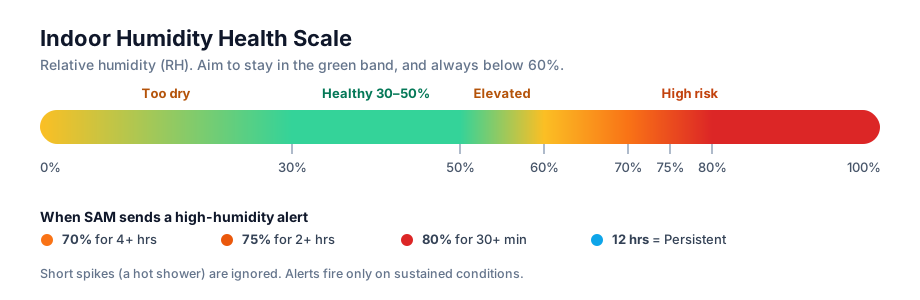
| Relative Humidity | What It Means | Action |
|---|---|---|
| Below 30% | Too dry, see Low Humidity | Add moisture |
| 30% to 50% | Healthy, comfortable, mold-resistant | Maintain |
| 50% to 60% | Elevated, mold risk rising | Improve ventilation, watch the trend |
| 60% to 70% | High risk, mold-favorable conditions | Run a dehumidifier, act today |
| Above 70% | Excessive, risk of damage to the house itself | Run a dehumidifier now and look for a water source |
ASHRAE recommends limiting relative humidity to 65% or lower for comfort and mold control. The 30% to 50% band we recommend is the tighter, safer target.
What should I do when I get a humidity alert?
Work through the steps below in order. The first few are free and take seconds. The later steps tackle a persistent or recurring problem.
Step 1: Turn on ventilation right away
Run your bathroom and kitchen exhaust fans, and leave them on for 20 to 30 minutes after showering or cooking. Open windows if the outdoor air is drier than inside (cool, non-rainy days); on muggy days, keep them closed. Running your air conditioner also helps fast, since AC removes moisture from the air as it cools.
Step 2: Track down the moisture source
Look for an obvious cause you can remove: a running shower, a pot boiling on the stove, wet towels, or laundry drying indoors. Clearing the source is often the entire fix.
Step 3: Run a dehumidifier
Place a dehumidifier in the affected area, especially basements, crawl spaces, and laundry rooms, and set it to hold humidity around 45%. This is the most reliable way to bring a damp space back into the healthy range.
Step 4: Check for hidden water and leaks
Look under sinks, around the water heater, and behind the washing machine for a slow leak feeding the moisture. Sustained high humidity in one room often points to a plumbing leak, a roof leak, or groundwater entering a basement.
Step 5: Improve air circulation and ventilation
Use a fan to move air across the damp room, which helps surfaces dry and discourages mold from settling. Confirm your bathroom and dryer vents actually exhaust outdoors, not into the attic or crawl space, which only relocates the moisture.
Step 6: Call a professional if it persists
If humidity stays high despite a running dehumidifier, it is time for help. SAM can connect you to your trusted service pro directly from the alert.
If the Alert Keeps Coming Back: Check the Dehumidifier, the Sensor and the Crawl Space
When the same space keeps raising alerts, check these before calling a pro:
- Is there a dehumidifier? If the space has none, it probably needs one. See Choosing a Dehumidifier below.
- Is the dehumidifier doing its job? Make sure it's the right size for the space, it's running, and it drains properly (the hose or pump isn't blocked and the tank isn't full). Clean or replace its filter if needed. See When to Change Your Dehumidifier Filter.
- Is the sensor in a representative spot? It should read the space as a whole, such as the middle of the crawl space or basement, not sit next to a temporary moisture source like a dryer vent or a recent spill. See Where to Place Your Shipshape Sensors.
- Is there standing water? A plumbing leak or poor drainage can keep humidity high no matter how hard the dehumidifier works.
- Is the crawl space open to the ground? Covering the dirt floor with plastic sheeting keeps ground moisture out. Many homes go further and encapsulate the crawl space: the vents are sealed, a vapor barrier covers the floor and walls, and a dehumidifier keeps it dry. Your service pro can tell you what suits your home. See Crawlspace Management.
Room by Room
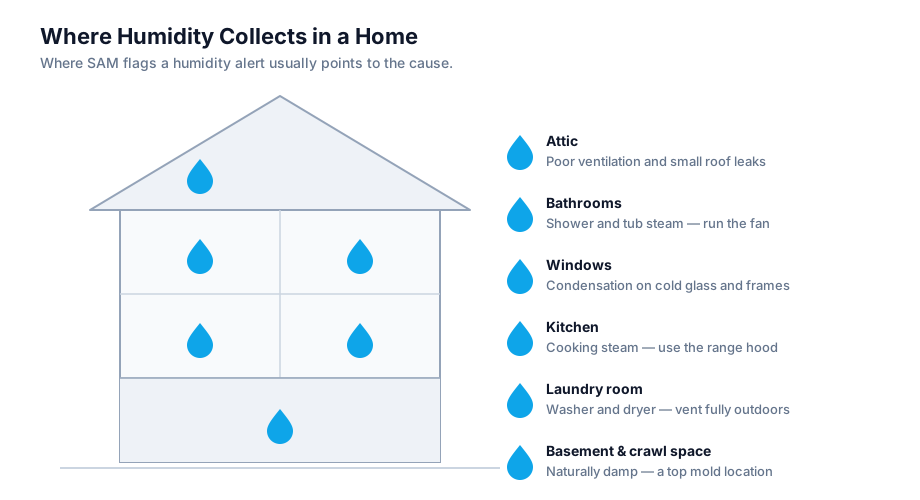
Where SAM flags the problem tells you a lot about the cause.
- Bathrooms — Showers and tubs create constant moisture. Run the exhaust fan during and after every shower, and keep the door open afterward to let the room dry.
- Basements and crawl spaces — Naturally damp and a top mold location. A dedicated dehumidifier is usually the right long-term answer. Check for groundwater intrusion and grading that directs rain toward the foundation.
- Kitchens — Boiling, simmering, and dishwashing add moisture. Use the range hood, and make sure it vents outside.
- Laundry rooms — Washers and dryers produce significant humidity. Confirm the dryer vents fully outdoors and is not clogged with lint.
- Attics — Poor ventilation plus a small roof leak can create hidden mold. A musty smell with no visible source is a warning sign.
- Near windows — Condensation on cold glass and frames is an early indicator that a room is too humid.
Seasonal Patterns
High humidity is most common in warm, wet months:
- Summer air holds more moisture. Warm outdoor air carries far more water vapor, and it follows you indoors every time a door opens.
- Rain and storms raise outdoor humidity and can drive water into basements and crawl spaces.
- Air conditioning that is undersized or off lets indoor moisture build. AC is your primary summer dehumidifier, so a struggling system shows up as rising humidity first.
- Spring thaw and snowmelt can saturate the ground around your foundation and push moisture into lower levels.
If SAM shows humidity creeping up as the season warms, that is your cue to get a dehumidifier in place before the peak.
Practical Tips to Prevent Mold
- Monitor and maintain levels. Use dehumidifiers or AC to stay below 60% RH. Vent appliances like dryers and stoves outside.
- Improve ventilation. Run exhaust fans in bathrooms and kitchens for 20 to 30 minutes after use. Open windows when outdoor humidity is low.
- Fix moisture sources. Repair leaks promptly and dry wet areas within 48 hours. Use moisture barriers in basements and crawl spaces.
- Inspect regularly. Check hidden areas for musty odors and discoloration. Clean small spots with soap and water. (Before reaching for bleach, see Mold Prevention — bleach should not be used on porous surfaces like wood or drywall.)
- Adjust for the season. In humid seasons, lean on your sensors and adjust HVAC settings. ASHRAE suggests keeping RH at 65% or lower; we recommend the tighter 30 to 50% range.
Choosing a Dehumidifier
For persistent dampness, a dehumidifier is the most reliable fix. The right type depends on the space.
| Type | Best For | Notes |
|---|---|---|
| Portable | Single rooms, basements | Affordable, movable, empty the tank or set up a drain hose |
| Crawl space unit | Sealed crawl spaces | Built for low, enclosed areas, often drains automatically |
| Whole-home (HVAC) | The entire house | Most effective and hands-off, professionally installed on your ductwork |
Sizing tips:
- Match the unit's pint-per-day capacity to the size and dampness of the space. Larger or wetter areas need higher capacity.
- Set the target to 45% so you stay comfortably inside the healthy band.
- A unit with a built-in humidistat will cycle on and off automatically to hold your setting.
- Clean or replace the filter on schedule so the unit keeps working efficiently. See When to Change Your Dehumidifier Filter, and SAM can remind you.
How SAM Helps You Stay Ahead of It
SAM does much more than read a number off a sensor. It gives you context, history, and a path to action.
- Continuous monitoring — Your sensors track humidity around the clock, so a slow climb gets caught early instead of after damage appears.
- Real-time notifications — Alerts reach you by push notification and email, so you never miss a developing problem.
- Sustained-condition logic — SAM ignores harmless short spikes and only alerts on the tiered conditions above, so the alert always means something.
- History you can check — The app's sensor charts show how humidity has moved over days and weeks, so you can see whether it rises overnight or after rain.
- Plain-language guidance — Every alert tells you what was detected, why it matters, and what to do next.
- Leak detection — If you have Shipshape water and leak sensors, they catch intrusion at the earliest stage, often the real source behind stubborn high humidity.
- Pro Monitoring follow-up — For Persistent alerts, Pro Monitoring subscribers may hear directly from our team to help resolve the issue. Our team can help you read the data, troubleshoot the dehumidifier or other appliance, and find a service pro.
- One-tap help — When a problem needs a professional, SAM connects you to your trusted service pro directly from the alert.
You can review your humidity history anytime in the Shipshape app under your sensor charts. Watch the trend line settle back into the 30% to 50% band to confirm your dehumidifier or ventilation changes are doing their job.
When to Call a Professional
Most high humidity issues resolve with ventilation and a dehumidifier. Reach out to your service pro if:
- Humidity stays above 60% despite running a dehumidifier
- You find visible mold larger than a bath towel (roughly 10 square feet)
- You smell mold but cannot find the source (it may be behind walls or under flooring)
- High humidity appeared after flooding or a major water event
- A basement or crawl space stays damp and you suspect groundwater intrusion
- You want a whole-home dehumidifier installed for a permanent solution
Trusted External Resources
- EPA — A Brief Guide to Mold, Moisture and Your Home
- EPA — What Are the Main Ways to Control Moisture in Your Home?
- CDC — About Mold
- CDC — Preventing Mold
- ASHRAE — Indoor environmental standards
Need Help?
If you have questions or need help setting up your humidity alerts, contact us. We are here to help.